
Best Stock Photo Keywording Tools in 2026 (7 Tested & Ranked)
We tested 7 AI-powered stock photo keywording tools across 10 benchmark images and 70 metadata outputs - comparing accuracy, keyword order, hallucination control, workflow, stock-platform readiness, and pricing.
 Written by Viacheslav Ra Oct 9, 2026
On This Page
Quick Results
AI keywording tools all promise roughly the same thing: upload an image and get usable stock metadata in seconds. The actual results are much less uniform.
For this comparison, we tested seven dedicated AI-powered stock photo keywording tools using the same set of 10 stock-style images. Rather than judging them from a few screenshots or feature lists, every tool was scored against a fixed 100-point benchmark covering metadata accuracy, keyword relevance, ordering, hallucination control, titles and descriptions, batch workflow, stock-platform support, editing controls, processing reliability, and pricing.
In total, the metadata portion alone included 70 individual image tests and 17 scoring criteria per result. The seven tools tested were: Noamax AI, Pixify Studio, PhotoKeyworder, Xpiks, PhotoTag, ImStocker Vision, and CyberStock.
| Rank | Tool | Final Score / 100 | Metadata Quality / 65 | Workflow & Features / 35 |
|---|---|---|---|---|
| 1 | Noamax AI 🥇 | 91.88 | 59.98 | 31.90 |
| 2 | Pixify Studio | 86.67 | 56.97 | 29.70 |
| 3 | PhotoKeyworder | 86.09 | 56.69 | 29.40 |
| 4 | Xpiks | 82.87 | 55.32 | 27.55 |
| 5 | PhotoTag | 78.72 | 51.02 | 27.70 |
| 6 | ImStocker Vision | 78.26 | 51.06 | 27.20 |
| 7 | CyberStock | 65.21 | 39.26 | 25.95 |
Why Noamax AI Ranked #1
- Highest Metadata Quality: 59.98 / 65
- Highest Workflow & Features Score: 31.90 / 35
- Highest metadata score on all 10 benchmark images
- Strong keyword prioritization with fewer speculative concepts replacing core subjects
- Best day-to-day batch review and editable history workflow
- Strong Adobe Stock readiness and automatic iStock & Getty disambiguation
🥇 Final Score: 91.88 / 100
How We Tested the AI Keywording Tools
Most keywording comparisons concentrate on whether a tool can generate keywords at all. That is a very low bar in 2026. For a stock contributor, the more useful questions are:
- Are the keywords actually supported by the image?
- Are the most important concepts ranked first?
- Does the tool identify specific details without inventing others?
- Does it understand commercial concepts without turning them into keyword spam?
- Are the title and description accurate?
- Can dozens or hundreds of assets be reviewed efficiently?
- Does the workflow understand Adobe Stock, iStock & Getty and other microstock requirements?
- How much control does the contributor retain?
- And how much does the complete workflow actually cost?
The 7 Tools We Tested
Only products that went through the standardized benchmark are included in the final ranking:
- Noamax AI
- Pixify Studio
- PhotoKeyworder
- Xpiks
- PhotoTag
- ImStocker Vision
- CyberStock
We intentionally did not add smaller tools simply to reach an arbitrary "Top 10". A seven-tool comparison in which every product was actually tested is more useful than a ten-tool ranking padded with products that were only researched from their marketing pages.
The 10-Image Test Set
Every tool received the same 10 images.
| Test | Image Type | What It Was Designed to Test |
|---|---|---|
| IMG-01 | Simple isolated object | Object recognition, materials, specificity and clean keyword ordering |
| IMG-02 | Person performing an action | Subject / action recognition, motion and fitness concepts |
| IMG-03 | Business scene with multiple objects | Object prioritization and finance / business context |
| IMG-04 | Multiple people / lifestyle | Relationships, simultaneous actions and hallucination control |
| IMG-05 | Food / dish | Ingredient recognition and unsupported recipe assumptions |
| IMG-06 | Landmark / travel | Location recognition and geographic accuracy |
| IMG-07 | Wildlife | Species recognition, habitat and hallucination resistance |
| IMG-08 | Interior | Room, furniture and design-style understanding |
| IMG-09 | Aerial landscape | Environment, viewpoint, season and activity inference |
| IMG-10 | Abstract 3D composition | Conceptual interpretation versus invented meaning |
We Defined the Ground Truth Before Scoring the Tools
| Image | Primary Subject | Primary Action | Setting / Context | Must-Have Concepts | Notes |
|---|---|---|---|---|---|
| IMG-01 | Disposable paper takeaway cup | None | Studio, isolated product-style image, neutral gray background | paper cup; disposable cup; takeaway cup; cup; lid | Tests object and material specificity, ordering, and hallucination control when contents are not visible. |
| IMG-02 | Single runner / person | Running / jogging | Outdoor sports field / running area, golden hour, backlit scene | runner; running; jogging; person; outdoor; exercise; fitness | Tests subject, action, and motion recognition while avoiding invented race, event, or location details. |
| IMG-03 | Business / financial workspace | None directly visible; financial analysis / business planning is implied | Office desk, business workspace, finance / accounting context | laptop; calculator; financial charts; financial report; keyboard; notebook; office desk; business | Tests object prioritization, finance context, literal versus conceptual terms, and unsupported financial claims. |
| IMG-04 | Group of people / pedestrians | Walking, standing, sitting, social interaction | Outdoor urban pedestrian space, courtyard / passage, greenery, casual everyday setting | people; group; walking; pedestrians; outdoor; lifestyle; public space | Tests multiple people and actions while avoiding invented relationships, events, demographics, or locations. |
| IMG-05 | Pizza | None | Overhead food photography, wooden serving board, rustic food setting | pizza; sliced pizza; chicken; pineapple; cheese; red onion; food; meal | Tests dish and visible ingredient recognition without inventing ingredients. |
| IMG-06 | Santorini hillside village / Greek island architecture | None | Travel destination, coastal village, sunset / twilight, Mediterranean island | Santorini; Oia; Greece; Greek island; travel; landmark; architecture; white buildings | Tests landmark and destination accuracy while avoiding incorrect Mediterranean locations. |
| IMG-07 | Zebras | Standing / grazing / resting in habitat | Savanna / grassland / wildlife / safari environment | zebra; zebras; wildlife; animal; striped animal; nature; grass; savanna or grassland | Tests species recognition, multiple subjects, habitat understanding, and hallucination resistance. |
| IMG-08 | Modern living room interior | None | Residential interior, contemporary living space, daylight | living room; interior; sofa; chair; coffee table; furniture; modern interior; home | Tests room and furniture recognition without overclaiming styles, property types, or designers. |
| IMG-09 | Forest landscape from above | None | Outdoor nature scene, aerial / drone perspective, woodland trail | forest; trees; aerial view; nature; landscape; trail; dirt road; outdoor | Tests aerial perspective, environment, trails, and season while avoiding invented locations or activities. |
| IMG-10 | Abstract 3D geometric shapes | None | Digital abstract artwork / 3D render | abstract; geometric shapes; 3D; blocks; geometry; digital art | Tests abstract-image specificity while avoiding an invented technology or business meaning. |
The 100-Point Scoring System
The benchmark is split into two major parts.
Metadata Quality - 65 points
| Main Category | Submetric | Max Points | Maximum |
|---|---|---|---|
| Keyword Relevance & Factual Accuracy | Primary Subject & Action Accuracy | 6 | 25 |
| Top-10 Factual Precision | 6 | ||
| Full-List Factual Relevance | 5 | ||
| Hallucination Control | 5 | ||
| Specific Detail Accuracy | 3 | ||
| Keyword Specificity & Conceptual Coverage | Must-Have Concept Coverage | 6 | 15 |
| Secondary Concept Coverage | 3 | ||
| Commercial & Contextual Concepts | 4 | ||
| Specificity vs Generic Filler | 2 | ||
| Keyword Ordering & Top-10 Quality | Must-Have Concepts in Top 10 | 6 | 15 |
| Top-10 Priority Order | 5 | ||
| Full-List Ordering | 3 | ||
| Top-10 Focus | 1 | ||
| Title & Description Quality | Title Accuracy & Relevance | 4 | 10 |
| Description Accuracy & Completeness | 3 | ||
| Naturalness & Readability | 2 | ||
| Metadata Consistency | 1 | ||
| Total | 65 | ||
Within those four categories are 17 individual submetrics, including subject accuracy, factual precision, hallucination control, must-have concept coverage, specificity, first-10 ordering, title accuracy, readability and metadata consistency.
Each tool's / 65 result is the average across all 10 images rather than a single hand-picked example.
Product & Workflow - 35 points
| Main Category | Submetric | Max Points | Maximum |
|---|---|---|---|
| Batch Workflow, UI/UX & Productivity | Batch Upload & Setup | 1.5 | 10 |
| Processing Status & Feedback | 1.5 | ||
| Batch Review & Editing Efficiency | 2 | ||
| Bulk Actions & Export Flow | 1.5 | ||
| Navigation & Overall UI/UX Clarity | 1.5 | ||
| Errors, Retry & Recovery | 1 | ||
| History / Reopen / Daily Workflow | 1 | ||
| Stock-Platform Readiness & Exports | Adobe Stock Readiness | 2 | 10 |
| iStock & Getty Controlled Vocabulary & Disambiguation | 2 | ||
| Other Stock Platform Coverage | 2 | ||
| CSV / Export Quality & Usability | 1.5 | ||
| Platform-Specific Presets / Rules | 1.5 | ||
| Embedded IPTC/XMP Metadata | 1 | ||
| Processing Speed & Reliability | Single-Image Processing Speed | 2 | 5 |
| 10-Image Batch Throughput | 2 | ||
| Processing Reliability | 1 | ||
| Editing, Control & Customization | Keyword Count / Output Controls | 1 | 5 |
| Manual Metadata Editing & Reordering | 1 | ||
| Custom Instructions / Presets | 1 | ||
| Regenerate / Retry / Partial Reprocessing | 1 | ||
| Workflow Configuration & Saved Controls | 1 | ||
| Pricing, Free Access & Value | Free Access / Trial | 1 | 5 |
| Cost Efficiency ~100 Images | 1 | ||
| Cost Efficiency ~500 Images | 1 | ||
| Cost Efficiency ~1,000 Images | 1 | ||
| Pricing Transparency & Flexibility | 1 | ||
| Total | 35 | ||
Together: 65 metadata points + 35 product & workflow points = 100 points.
Why We Put So Much Weight on Keyword Order
Keyword order is particularly important for Adobe Stock.
📌 Adobe's contributor guidance recommends ordering keywords by importance, with the strongest and most relevant terms first. Adobe also emphasizes the importance of the first keywords and recommends starting with the main subject and other essential visible elements before moving into broader themes and concepts.
That is why our benchmark does not give the same score to these two hypothetical lists:
pizza, chicken, pineapple, cheese, red onion, cilantro...
and:
gastronomy, hospitality, lifestyle, socializing, convenience... pizza
Both may contain commercially related words, but they do not communicate the image with the same precision or priority. For this reason, the benchmark separately evaluates:
- Top-10 Factual Precision
- Must-Have Concepts in the Top 10
- Top-10 Priority Order
- Top-10 Focus
Those measurements exposed some of the largest differences between the tools.
How to Read the Diagnostic Scores
In addition to the / 65 metadata score, the article shows two useful diagnostic columns:
Top-10 Quality - combines the measurements specifically related to the first 10 keywords. Hallucination Control - measures how consistently the system avoids unsupported factual or conceptual claims.
📌 These are not additional points added to the 65-point benchmark. They expose important parts of the underlying scoring so readers can understand why two tools with relatively similar totals may behave differently.
Metadata Quality: What We Found Across 70 Tests
The metadata benchmark produced 70 independently scored results: seven tools tested against the same 10 images. Each result was scored against the fixed ground truth described above, and the final / 65 score for each tool is the average of its 10 image scores.
| Rank | Tool | Image Benchmark / 65 | Accuracy / 25 | Coverage / 15 | Ordering / 15 | Title & Description / 10 | Top-10 Quality / 18* | Hallucination Control / 5* | Image Wins |
|---|---|---|---|---|---|---|---|---|---|
| 1 | Noamax AI 🥇 | 59.98 | 22.84 | 14.14 | 13.28 | 9.72 | 16.30 | 4.26 | 10 / 10 |
| 2 | Pixify Studio | 56.97 | 21.33 | 13.64 | 12.99 | 9.01 | 15.95 | 3.67 | 0 |
| 3 | PhotoKeyworder | 56.69 | 21.19 | 13.36 | 12.92 | 9.22 | 15.98 | 3.45 | 0 |
| 4 | Xpiks | 55.32 | 20.88 | 13.17 | 12.49 | 8.78 | 15.37 | 3.75 | 0 |
| 5 | ImStocker Vision | 51.06 | 19.33 | 12.30 | 10.91 | 8.52 | 13.81 | 2.84 | 0 |
| 6 | PhotoTag | 51.02 | 19.99 | 11.71 | 10.83 | 8.49 | 13.63 | 3.44 | 0 |
| 7 | CyberStock | 39.26 | 15.33 | 11.71 | 5.81 | 6.41 | 5.93 | 2.35 | 0 |
The Headline Result: Keyword Quality Was Not Evenly Distributed
Noamax AI recorded the highest total score on all 10 images, finishing with an average of 59.98 / 65.
That does not mean every individual Noamax output was perfect. Points were deducted for some weaker tail keywords. But across the complete test set, it was the most consistent at keeping important visual concepts near the top while avoiding unsupported interpretations.
Pixify Studio and PhotoKeyworder were separated by only 0.28 points in the metadata benchmark: 56.97 versus 56.69.
Pixify finished second on six of the ten images, while PhotoKeyworder was particularly competitive on food, interiors and aerial landscapes.
Xpiks finished fourth at 55.32 / 65, but its 3.75 / 5 hallucination-control average was the second highest in the test, ahead of both Pixify and PhotoKeyworder. Its weaker point was generally prioritization rather than basic factual recognition.
PhotoTag and ImStocker Vision were almost tied overall at 51.02 and 51.06, despite behaving differently. PhotoTag tended to produce reasonably clean outputs but missed or under-prioritized important concepts more often. ImStocker frequently recognized the main subject correctly but was more willing to add speculative locations, activities or contextual ideas.
CyberStock was the largest outlier. Its concept coverage score of 11.71 / 15 was not unusually low. The more serious problem was what happened to those concepts after generation: its Ordering score fell to 5.81 / 15, and its Top-10 Quality averaged only 5.93 / 18.
📌 In other words, the tool often found useful visible concepts somewhere in the list - but frequently put broader commercial ideas ahead of them.
Some Images Were Much Harder Than Others
The multiple-people lifestyle scene, IMG-04, produced the lowest average score across the seven tools at approximately 48.73 / 65.
The image contained several people walking, standing and sitting in an outdoor pedestrian space. It created many opportunities for unsupported inference:
- Were the people friends?
- A family?
- Tourists?
- Students?
- Attending an event?
- In a particular country?
- Part of a market or festival?
Different systems answered those implied questions very differently.
The aerial forest image, IMG-09, produced one of the strongest overall averages. Most systems could reliably identify the forest, aerial viewpoint, trees and winding path. However, even there some outputs drifted into unsupported concepts such as hiking, adventure, national parks or specific environmental contexts.
The abstract 3D image, IMG-10, produced the largest performance spread of the entire test: approximately 26.3 points between the highest- and lowest-scoring result. There is no literal business, artificial-intelligence system, blockchain network or data center in the image. It is an abstract 3D composition of geometric forms.
📌 Some systems remained close to that evidence. Others tried to assign a commercially attractive technological meaning to the scene. That distinction became one of the clearest examples of the difference between useful conceptual keywording and invented conceptual keywording.
Real Metadata Examples: Where the Tools Actually Differ
Aggregate scores are useful, but individual outputs make the differences much easier to see. Rather than reproducing all 70 results in the article, the examples below focus on several images that exposed different kinds of strengths and weaknesses. The complete benchmark workbook is publicly available for readers who want to inspect every result, score and evaluation criterion.
Landmark Recognition: Santorini Was Easy - Prioritizing It Correctly Was Harder

IMG-06 showed the hillside architecture of Santorini at sunset. The ground truth included major concepts such as: Santorini, Oia, Greece, Greek island, travel, architecture, white buildings, sunset and coastal village.
Most of the stronger systems recognized the destination. The difference was how confidently and how early they surfaced it.
Noamax AI (Image Score: 62.6 / 65) - first 10 keywords: santorini, greece, oia, village, houses, architecture, sunset, dusk, aegean, island
3 most specific geographic concepts - Santorini, Greece and Oia - occupied the first three positions.
Pixify Studio (Image Score: 59.8 / 65) - first 10: santorini, oia, sunset, village, greece, cliff, white, buildings, houses, caldera
Also pretty good. Pixify immediately identified Santorini and Oia and kept visible architectural concepts near the top.
PhotoKeyworder (Image Score: 59.6 / 65) - first 10: oia, santorini, greece, sunset, cycladic, architecture, white, houses, aegean, sea
Another good result, with very precise geographic and architectural terminology.
CyberStock (Image score: 40.6 / 65) - first 10: travel, tourism, vacation, destination, mediterranean, coastal, luxury, holiday, leisure, summer
It did eventually generate Greece and Santorini, but they appeared around positions 18 and 19. The system understood that this was Santorini, but its ranking logic placed broad buyer-oriented concepts such as travel, tourism, vacation, luxury and leisure above the actual destination.
📌 Its generated Adobe description followed the same approach and omitted Santorini despite the system having recognized Santorini in its keyword list. This was one of the clearest examples in our testing of why recognition accuracy and keyword prioritization need to be evaluated separately.
Hallucination Control: The Lifestyle Image Exposed the Most Assumptions

IMG-04 contained several people in a leafy outdoor urban pedestrian area. There was no reliable evidence establishing that they were: tourists, relatives, friends, students, participants in an event, or located in any specific country.
This became the hardest test image overall.
Noamax AI (Image Score: 57.5 / 65) concentrated primarily on observable concepts: people, alleyway, street, urban, walking, gathering, pedestrian, outdoors, passage, lane...
It still included some broader terms such as travel, tourism and summer later in the list, and those received deductions.
Pixify (Image Score: 52.1 / 65) started reasonably well: people, street, alley, pedestrians, crowd, urban, city, walking, candid...
but then moved into: tourists, tourism, family, friends, market, shops, heritage, tourist attraction...
Those concepts may describe some visually similar stock images, but this particular image does not establish them.
ImStocker Vision (Image Score: 42.9 / 65) included: asian, asia, indonesia, tourist, bali, balinese, religion, religious, school, family, daughter, ubud, indonesian...
The image may visually support some lower-confidence demographic inference, but the specific geographic, relationship and contextual claims create a much more specific story than the image itself establishes.
📌 A keyword does not become accurate simply because it might describe a plausible scenario. A strong keyword should help a buyer find content that genuinely represents the searched concept.
Abstract Images: Useful Concepts vs Invented Meaning

IMG-10 was deliberately chosen because it lacks an obvious real-world narrative.
The image contains abstract 3D geometric blocks, cubes, floating shapes, blue / turquoise tones and a gradient background. This allows useful conceptual interpretation - but only up to a point.
Noamax AI (Image Score: 62.2 / 65) early keywords: abstract, blocks, cubes, geometric, geometry, shapes, floating, concept, minimalism, rectangles...
Later terms included: modern, futuristic, digital, design, 3d, render
Pixify (Score: 59.1 / 65): abstract, 3d, geometric, cubes, teal, coral, minimal, futuristic, blocks, background...
It additionally introduced concepts such as: architecture, technology, hightech, innovation
PhotoKeyworder (Image Score: 57.5 / 65): abstract, geometry, 3d, digital, design, futuristic, structure, cube, shape, pattern...
Later additions included: technology, data, network, innovation, science, virtual, computer generated
CyberStock scored only 35.9 / 6 on this image.
Its broader benchmark pattern was especially costly here because abstract imagery gives a model enormous freedom to invent commercial interpretations.
📌 This image produced the largest score spread of all 10 tests, making it one of the clearest demonstrations that conceptual keywording needs constraints.
Food Recognition: Small Ingredient Errors Matter
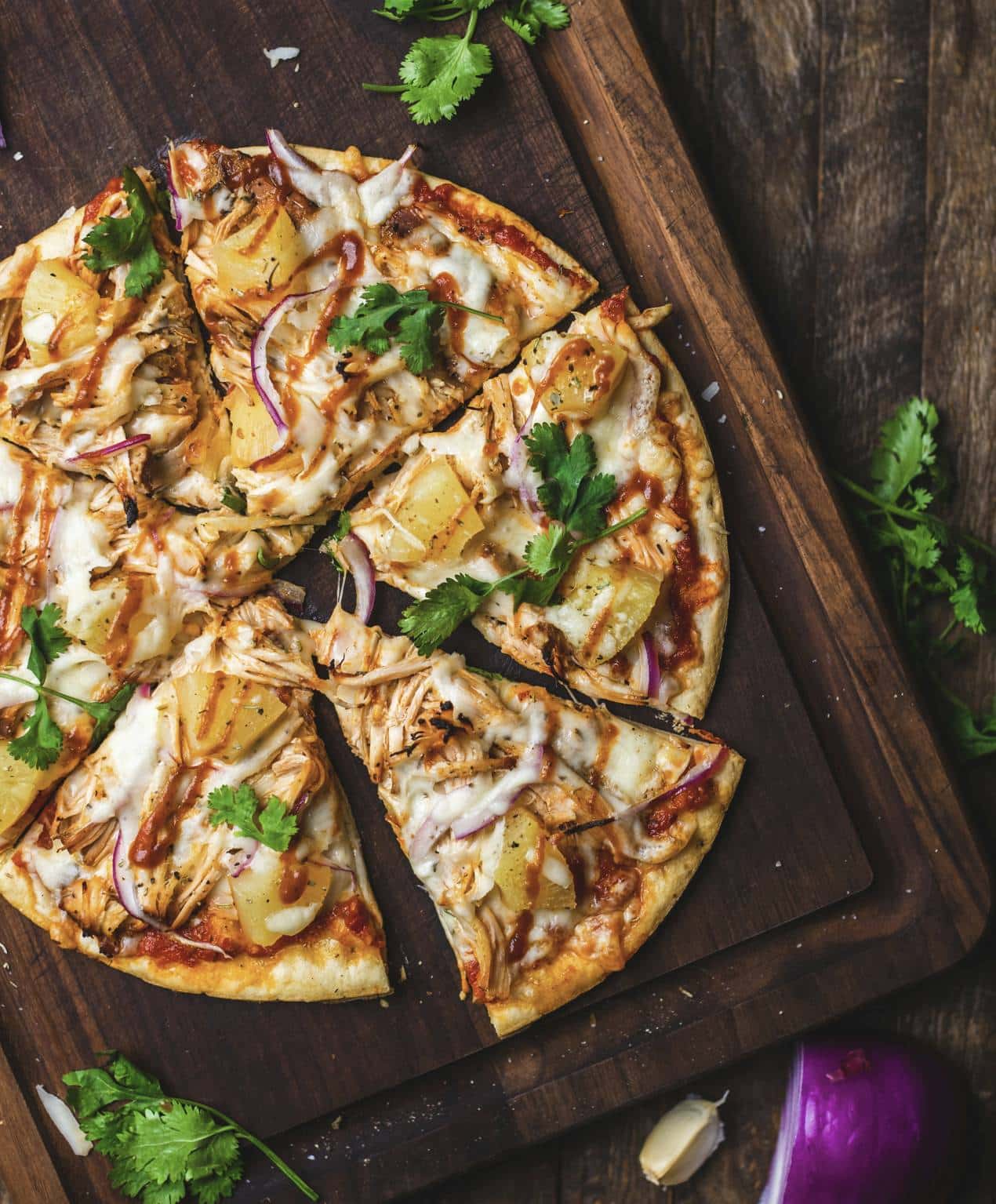
The pizza test was useful because many ingredients are directly visible. The ground truth included: pizza, chicken, pineapple, cheese, red onion, cilantro and meal / food concepts. We deliberately did not assume a named pizza style or sauce simply from its appearance.
Noamax AI (Image Score 58.8 / 65), it identified: pizza, chicken, pineapple, slice, cheese, onion, cilantro...
It lost some points for weaker terms such as mozzarella and italian, but the core ingredients were strongly represented.
PhotoKeyworder (Image Score 57.6 / 65), its first terms included: pizza, bbq, chicken, pineapple, red, onion, cilantro, mozzarella...
Pretty good ingredient recognition, but BBQ and mozzarella were treated as less certain than chicken, pineapple and red onion.
Pixify Studio (Image Score 56.0 / 65), produced: pizza, bbq, chicken, pineapple, cheese, slice, toppings, cilantro, onion, red onion...
It also introduced: barbecue sauce, Hawaiian pizza, tomato, garlic... which were not established by the image.
ImStocker Vision (Image Score 44.0 / 65), recognized pizza, cheese and pineapple, but completely missed the important chicken concept in its keyword list and added: vegetarian, ham, pepperoni, salami, olive, basil...
📌 Some of those terms directly conflict with the visible content. This example illustrates why simply counting the number of plausible food keywords would be a poor evaluation method.
What the Metadata Tests Suggest
Recognition itself is becoming relatively good. Most of the tested products could identify obvious subjects such as a runner, pizza, zebra, forest or living room. The larger differences appeared after recognition:
- which concepts were considered important;
- what entered the first 10;
- how aggressively the system inferred context;
- how much generic filler appeared;
- whether useful specificity was preserved;
- and whether commercial concepts remained grounded in the image.
The First 10 Keywords Separated the Strongest Tools
| Tool | Top-10 Quality / 18 |
|---|---|
| Noamax AI 🥇 | 16.30 |
| PhotoKeyworder | 15.98 |
| Pixify Studio | 15.95 |
| Xpiks | 15.37 |
| ImStocker Vision | 13.81 |
| PhotoTag | 13.63 |
| CyberStock | 5.93 |
Pixify and PhotoKeyworder were essentially tied on this diagnostic. CyberStock was the major outlier.
Its problem was often not complete failure to recognize the image. It was the decision to push generalized commercial concepts ahead of the specific visible content.
Commercial Concepts Are Useful - Until They Replace the Subject
Conceptual keywords such as fitness, travel, hospitality or sustainability can be valuable when the image clearly supports them - and strong concepts can rank near the top.
The problem is when broad or speculative concepts are prioritized ahead of the main subject.
A runner can reasonably support fitness, but not automatically success, competition or marathon. A disposable cup can support takeaway or packaging, but does not by itself prove biodegradable, compostable or sustainable.
📌 Strong visual concepts deserve strong positions. Weaker interpretations should appear lower in the list, while unsupported concepts are better omitted.
The Hardest Images Were Not Necessarily the Most Visually Complex
The multiple-person scene was harder than the recognizable Santorini landmark. Uncertainty creates more opportunities for inference. Santorini gives the system a concrete destination to recognize.
A group of unidentified people in a public space creates dozens of possible narratives - relationships, intentions, activities, demographics and locations - many of which may be plausible without being factual. For stock metadata, resisting those plausible-but-unsupported stories is a meaningful capability.
Workflow & Feature Comparison: Metadata Quality Is Only Half the Job
Good metadata is the starting point, but stock contributors rarely process one image at a time.
A useful stock photo keywording tool also needs to handle batches efficiently, make reviewing and correcting metadata practical, export into the formats contributors actually use, recover cleanly from processing problems, and remain affordable at real portfolio volumes.
For that reason, 35 of the 100 benchmark points were assigned to the product itself rather than the generated metadata. We evaluated five areas:
- Batch Workflow, UI/UX & Productivity - 10 points
- Stock-Platform Readiness & Exports - 10 points
- Processing Speed & Reliability - 5 points
- Editing, Control & Customization - 5 points
- Pricing, Free Access & Value - 5 points
Workflow & Features Results
| Tool | Total / 35 | Batch Workflow / 10 | Stock Readiness / 10 | Speed & Reliability / 5 | Editing & Control / 5 | Pricing & Value / 5 |
|---|---|---|---|---|---|---|
| Noamax AI 🥇 | 31.90 | 9.80 | 8.80 | 5.00 | 3.70 | 4.60 |
| Pixify Studio | 29.70 | 9.20 | 7.90 | 4.80 | 4.20 | 3.60 |
| PhotoKeyworder | 29.40 | 8.10 | 8.80 | 4.50 | 3.50 | 4.50 |
| PhotoTag | 27.70 | 7.40 | 6.80 | 4.90 | 4.30 | 4.30 |
| Xpiks | 27.55 | 8.50 | 6.75 | 4.60 | 3.50 | 4.20 |
| ImStocker Vision | 27.20 | 8.00 | 6.80 | 4.60 | 2.90 | 4.90 |
| CyberStock | 25.95 | 8.10 | 5.85 | 4.60 | 3.50 | 3.90 |
The results here were much more mixed than the metadata benchmark. No single competitor dominated every product category, and several tools that ranked lower on metadata quality had genuine workflow or pricing strengths.
Batch Workflow, UI/UX & Productivity
| Tool | Batch Workflow, UI/UX & Productivity / 10 |
|---|---|
| Noamax AI 🥇 | 9.8 |
| Pixify Studio | 9.2 |
| Xpiks | 8.5 |
| PhotoKeyworder | 8.1 |
| CyberStock | 8.1 |
| ImStocker Vision | 8.0 |
| PhotoTag | 7.4 |
🥇 Noamax AI scored highest in this category.
The strongest part of the workflow was not simply batch uploading. It was what happens after processing. Completed batches remain available in an editable history where individual files can be reopened, metadata reviewed and changed, keywords inspected, Getty controlled-vocabulary results viewed, and exports regenerated.
📌 Its interface was also the strongest for day-to-day use: professional, simple, clear, and easy to work with without unnecessary friction.
Pixify interface was clean, light and pretty simple to use.
Xpiks remained competitive, particularly for users who prefer a more traditional desktop-oriented contributor workflow.
PhotoTag's interface and review workflow were not always intuitive in our testing. Free mode also restricted copying and CSV export, made long descriptions difficult to review, and offered limited control over editing or reorganizing keywords.
Stock-Platform Readiness & Exports
| Tool | Stock Readiness / 10 |
|---|---|
| Noamax AI 🥇 | 8.80 |
| PhotoKeyworder | 8.80 |
| Pixify Studio | 7.90 |
| PhotoTag | 6.80 |
| ImStocker Vision | 6.80 |
| Xpiks | 6.75 |
| CyberStock | 5.85 |
Noamax AI received full scores for iStock & Getty controlled vocabulary and disambiguation, other stock-platform coverage, CSV export quality and platform-specific handling. Its main weakness here is clear: currently does not write IPTC/XMP metadata directly into the original file.
PhotoKeyworder also performed very well on stock-platform functionality and supports embedded metadata for supported image formats.
Pixify offers good stock-oriented workflow, including dedicated iStock & Getty functionality.
Xpiks and PhotoTag have an advantage for contributors who need metadata written directly into files.
CyberStock has broad platform/export positioning and embedded IPTC capability, but its Adobe-oriented metadata-readiness result reduced its overall score.
Adobe Stock Readiness Was Based on Actual Outputs
We did not award two points simply because a product offered an "Adobe" preset. The score was derived primarily from the actual metadata benchmark.
| Tool | Adobe Stock Readiness / 2 |
|---|---|
| Noamax AI 🥇 | 1.80 |
| Pixify Studio | 1.70 |
| PhotoKeyworder | 1.70 |
| Xpiks | 1.65 |
| PhotoTag | 1.50 |
| ImStocker Vision | 1.50 |
| CyberStock | 0.85 |
The heaviest weighting went to:
- Top-10 factual precision
- must-have concepts appearing in the first 10
- Top-10 priority order
- full-list relevance
- hallucination control
- Top-10 focus
- title accuracy
- metadata consistency
📌 An Adobe export format does not mean the underlying metadata is optimized for Adobe.
Embedded IPTC/XMP Support
| Tool | Embedded Metadata / 1 |
|---|---|
| Xpiks 🥇 | 1.0 |
| PhotoTag | 1.0 |
| PhotoKeyworder | 0.9 |
| ImStocker Vision | 0.8 |
| CyberStock | 0.8 |
| Noamax AI | 0.0 |
| Pixify Studio | 0.0 |
For photographers whose workflow depends on keywords and descriptions being written directly into JPGs or sidecar files, this can be a meaningful deciding factor.
This is also a good example of why the comparison cannot simply conclude that the overall #1 tool is automatically the correct tool for every contributor.
Processing Speed & Reliability
| Tool | Speed & Reliability / 5 |
|---|---|
| Noamax AI 🥇 | 5.0 |
| PhotoTag | 4.9 |
| Pixify Studio | 4.8 |
| Xpiks | 4.6 |
| ImStocker Vision | 4.6 |
| CyberStock | 4.6 |
| PhotoKeyworder | 4.5 |
The differences were relatively small. Processing speed was not one of the major differentiators among the tools tested.
Editing, Control & Customization
| Tool | Editing & Control / 5 |
|---|---|
| PhotoTag 🥇 | 4.3 |
| Pixify Studio | 4.2 |
| Noamax AI | 3.7 |
| PhotoKeyworder | 3.5 |
| Xpiks | 3.5 |
| CyberStock | 3.5 |
| ImStocker Vision | 2.9 |
PhotoTag offered the widest set of controls in our scoring, with Pixify similarly flexible. More controls, however, did not always translate into a better workflow - some added complexity without providing much practical value in day-to-day keywording.
Noamax.ai received full points for keyword-count / output controls and manual metadata editing / reordering, but fewer points for custom instructions and regeneration options.
📌 This reflects a different product approach: Noamax AI keeps more of the complex decision-making in the background and exposes the controls contributors are most likely to need, resulting in a simpler and more streamlined workflow.
Pricing & Value
| Tool | Pricing & Value / 5 |
|---|---|
| ImStocker Vision 🥇 | 4.9 |
| Noamax AI | 4.6 |
| PhotoKeyworder | 4.5 |
| PhotoTag | 4.3 |
| Xpiks | 4.2 |
| CyberStock | 3.9 |
| Pixify Studio | 3.6 |
ImStocker was the lowest-cost option in our standardized comparison. Its Default processing mode offered particularly low per-image costs at medium and high volume.
📌 The trade-off was metadata quality.
Detailed Reviews of the 7 AI Keywording Tools
1. Noamax.ai
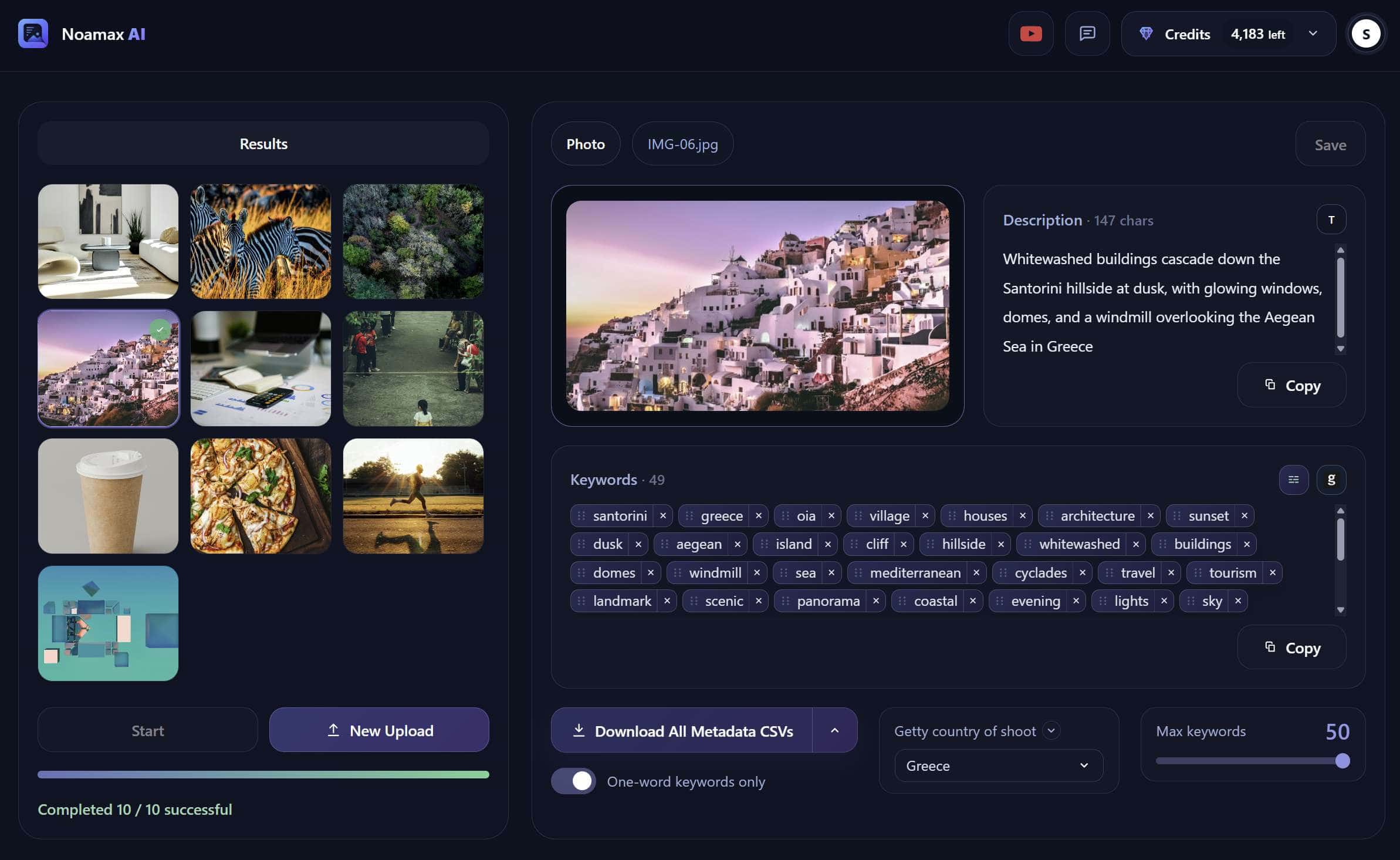
Final score: 91.88 / 100
Metadata Quality: 59.98 / 65
Workflow & Features: 31.90 / 35
Best For: contributors who want strong metadata quality, stock-specific keyword ordering, batch processing, iStock & Getty support, streamlined workflow without having to configure a large number of AI settings.
- AI-generated titles, descriptions, intelligently ranked keywords
- 20 free credits with registration
- Automatic iStock & Getty controlled-vocabulary matching and disambiguation
- Photos, vectors and videos in the same workflow
- Batch processing for up to 500 files
- 7-10-frame smart video analysis
- Editable metadata review, batch history and microstock-specific CSV exports
Noamax AI currently supports videos up to 1 GB depending on plan and analyzes multiple strategically selected frames rather than relying on a single poster frame. iStock & Getty disambiguation is included in the standard workflow at no additional cost.
- Highest metadata-quality score in our benchmark: 59.98 / 65
- Highest Batch Workflow / UI UX score: 9.8 / 10
- Strongest keyword ordering and Top-10 performance
- Excellent integrated iStock & Getty workflow
- Strong batch review and persistent editable history
- Genuine multi-frame video analysis
- No direct IPTC / XMP metadata write-back yet
- Fewer advanced prompt / custom-instruction controls
- Regeneration / partial reprocessing controls are less extensive than some competitors
What It Did Well
🥇 Noamax.ai finished first overall and also produced the highest metadata score on every one of the 10 benchmark images and the strongest part was consistency.
Across simple product images, food, wildlife, interiors, landmarks and abstract imagery, its results stayed relatively close together rather than performing extremely well on one image and collapsing on another. Its metadata benchmark ranged from 57.0 / 65 on the isolated cup image to 62.6 / 65 on the Santorini landmark image.
The biggest strength was not simply recognizing the subject. Noamax was better at combining:
- the main visible subject
- important secondary concepts
- commercially useful terms
- first-10 prioritization
- relatively conservative hallucination control
Keyword Ordering
Ordering score: 13.28 / 15
Top-10 Quality: 16.30 / 18
Both were the highest in the benchmark.
Some images still contained weaker tail keywords or terms that could reasonably be removed before submission. But the most important concepts were generally placed early.
Batch Workflow
Noamax AI also had the strongest Batch Workflow, UI/UX & Productivity score at 9.8 / 10.
A major strength was the editable batch history. Completed batches remain accessible and individual files can be reopened, reviewed and edited.
Users can revisit metadata, inspect standard and iStock & Getty vocabulary results, save changes, regenerate exports, and remove individual files or batches when no longer needed.
iStock & Getty Workflow
📌 It includes Getty controlled-vocabulary processing and disambiguation directly in the workflow. It does not require a separate higher-credit processing mode.
My Take
Noamax.ai performed best when an image required prioritization rather than simple recognition. It did not win because it generated more keywords. It won because the strongest visible subjects and the most relevant commercial concepts were more consistently placed near the top, while speculative ideas were less likely to displace them.
2. Pixify Studio
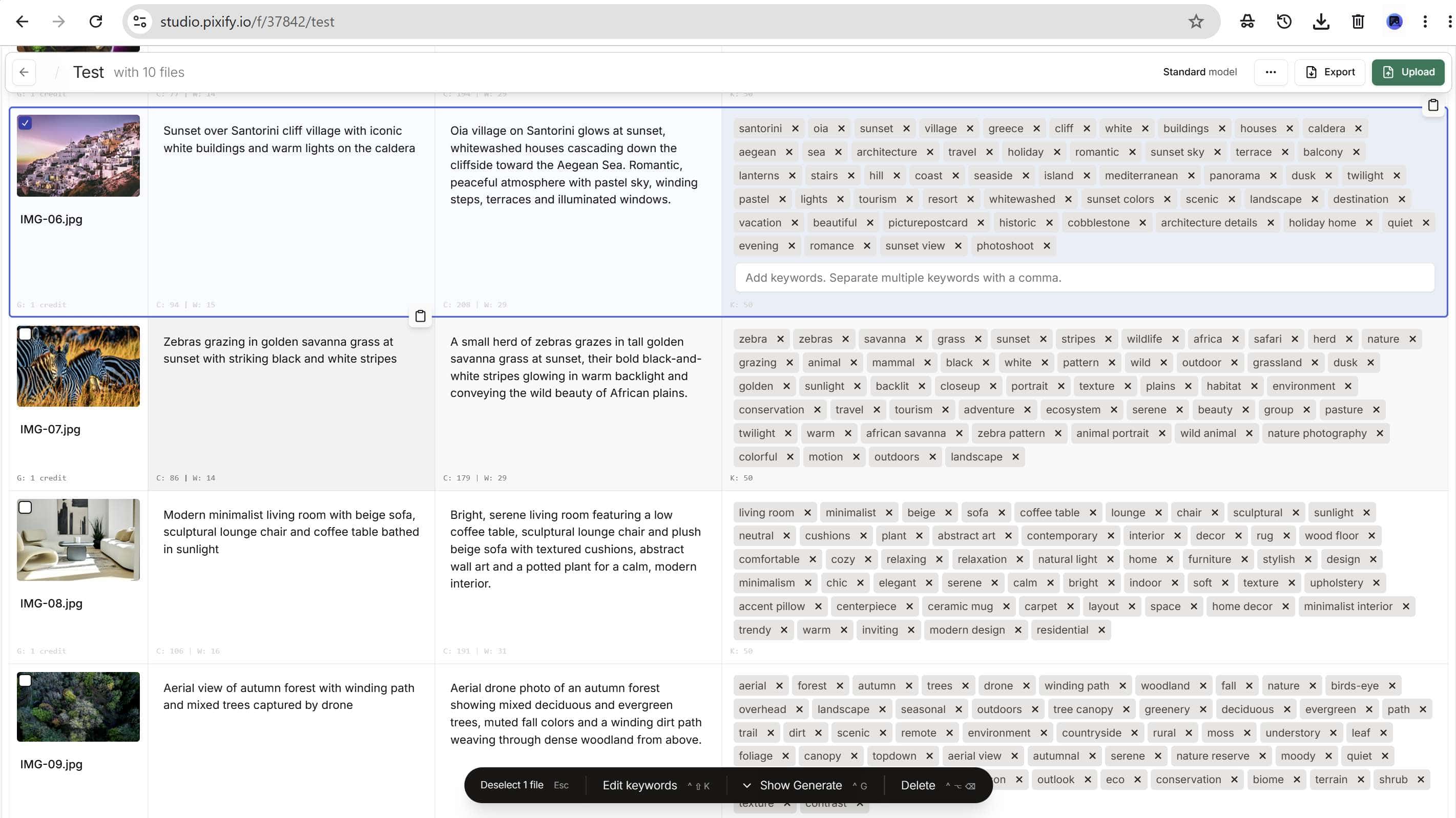
Final score: 86.67 / 100
Metadata Quality: 56.97 / 65
Workflow & Features: 29.70 / 35
Best For: contributors who want polished web interface, metadata generation and flexible editing controls.
- 10 free lifetime credits after phone verification
- AI titles, descriptions and keywords
- High-volume browser workflow with folders
- Photos and video support
- Dedicated iStock & Getty metadata model
- Custom instructions and configurable title, description and keyword lengths
- Batch review, editing, regeneration and CSV exports for major stock agencies
Pixify says videos are fully supported without a platform-imposed filesize or duration limit, with video generation charged by duration. It also lets users upload large collections through FTP and work with folders. Its dedicated iStock & Getty model currently costs 2 credits per generation.
- Second-highest metadata benchmark: 56.97 / 65
- Polished and efficient web workflow
- Good customization and editing controls
- Dedicated iStock & Getty functionality
- Full photo / video workflow
- No native IPTC / XMP write-back we could verify
- iStock & Getty processing costs more credits than standard processing
- Pricing becomes less competitive at some medium-volume levels
- More speculative concepts appeared in our image tests
What It Did Well
Pixify's metadata quality was consistently good. It scored especially well on simple objects, runner / action imagery, business scenes, landmarks, wildlife and abstract imagery.
Where It Lost Points
The biggest recurring metadata issue was over-interpretation. On the people / lifestyle image it introduced tourists, tourism, family, friends, market, shops and heritage despite those ideas not being reliably established.
On the food image it introduced BBQ, barbecue sauce and garlic. On the abstract image it moved into architecture, technology, hightech and innovation.
Getty and Pricing
Pixify has dedicated iStock & Getty functionality. However, Getty processing has different credit economics from standard processing. Its pricing was also less attractive around some medium-volume scenarios used in our benchmark.
3. PhotoKeyworder
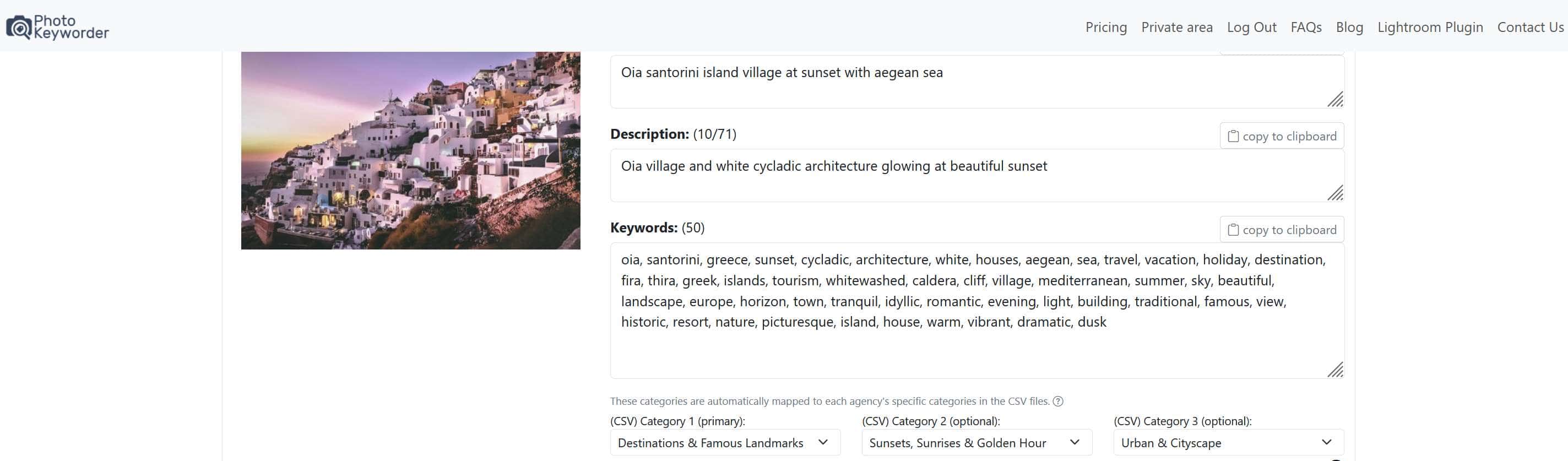
Final score: 86.09 / 100
Metadata Quality: 56.69 / 65
Workflow & Features: 29.40 / 35
Best For: contributors who want good metadata quality with stock-platform support and embedded metadata capabilities.
- 20 free credits
- AI titles, descriptions and keywords
- Batch processing of up to 500 photos, vectors or videos
- Dedicated iStock & Getty controlled-vocabulary tools for images and videos
- Metadata embedding for JPG, PNG and EPS
- Lightroom Classic plugin
PhotoKeyworder supports photos, vectors and videos and offers a iStock & Getty workflow for both images and video. For Getty video, metadata is delivered through CSV rather than embedded directly into the video.
- Good metadata quality: 56.69 / 65
- iStock & Getty support
- Embedded image metadata
- Lightroom Classic integration
- More speculative contextual concepts appeared on some benchmark images
- History and previous-work reopening were difficult to discover and not particularly intuitive.
- Getty processing involved additional credit usage
- Video stock workflows rely more heavily on CSV than embedded metadata
Metadata Quality
PhotoKeyworder finished only 0.58 points behind Pixify overall. It performed particularly well on food, landmarks, interiors and aerial landscapes.
Where It Struggled
PhotoKeyworder became less reliable when an image invited contextual inference. For wildlife it introduced national park, reserve, Kenya, Tanzania, tourism and travel.
The people / lifestyle image showed a similar pattern with tourists, marketplace, culture, destination, vacation and tourist attraction.
4. Xpiks
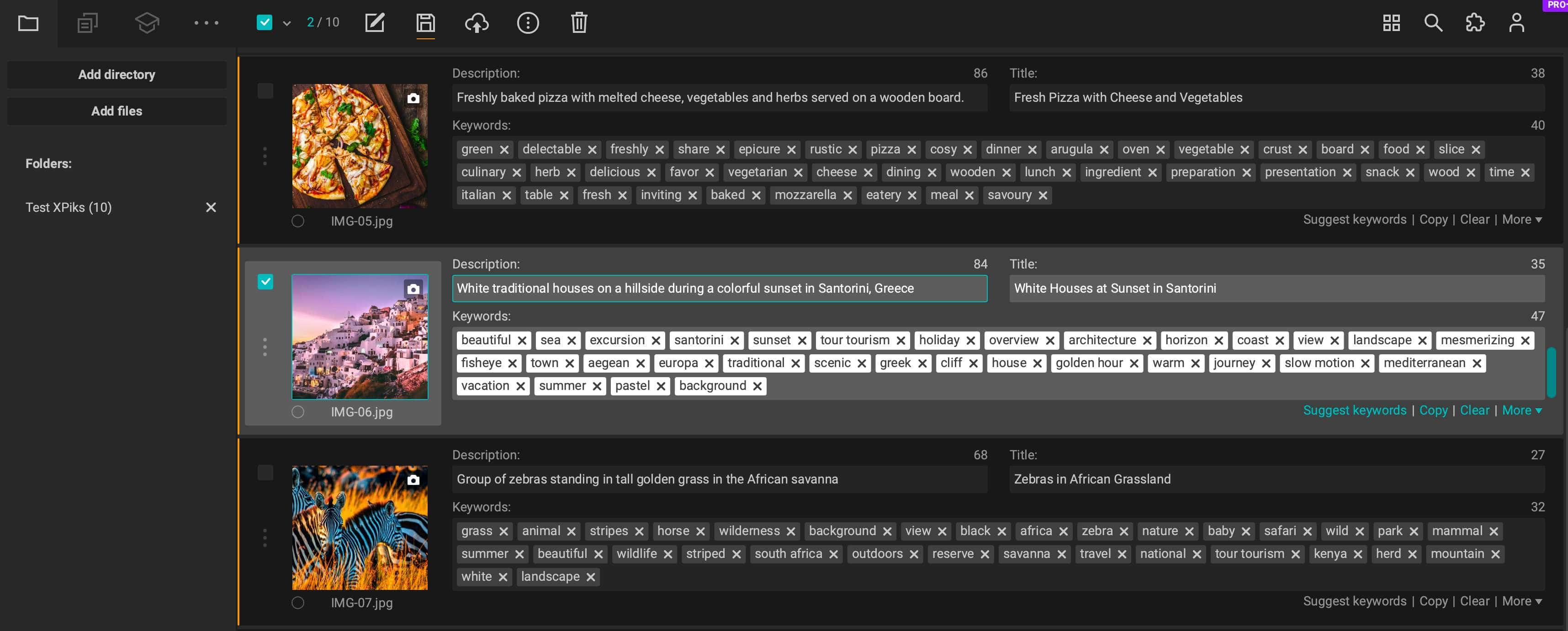
Final score: 82.87 / 100
Metadata Quality: 55.32 / 65
Workflow & Features: 27.55 / 35
Best For: contributors who prefer a desktop-oriented stock workflow and want pretty good embedded metadata support.
- Desktop app for Windows, macOS and Linux
- AI-generated titles, descriptions and keywords through Auto Keywording
- Photos, vectors and videos supported
- Batch AI generation
- Writes metadata directly into files using IPTC / XMP and video metadata
- Configurable CSV exports
- FTP / FTPS / SFTP uploads to supported stock agencies
- Cloud Upload, presets, blocklists and upload history
Xpiks supports photos, vectors and videos in its AI keywording plugin. It can write metadata into local files, and its workflow includes CSV export and direct FTP-based uploading. It also says video frames are extracted locally for AI processing rather than requiring the entire video to be uploaded.
- Good desktop/local-file workflow
- Strong IPTC/XMP metadata support
- Pretty good hallucination-control result in our benchmark
- Powerful upload and CSV workflow
- Mature presets and metadata editing
- Keyword priority / order was weaker than the top three
- No dedicated Getty controlled-vocabulary / disambiguation workflow
- Full AI metadata generation consumes 5 credits per file
- Auto Keywording requires Pro+
- Video cannot be played directly inside Xpiks; it opens externally instead
My Take
Xpiks feels less like a standalone AI keywording tool and more like a mature stock-contributor utility with AI functionality added into a broader workflow. Its main weakness was ordering rather than basic recognition. It often understood the image but did not consistently put the strongest microstock keywords first.
5. PhotoTag
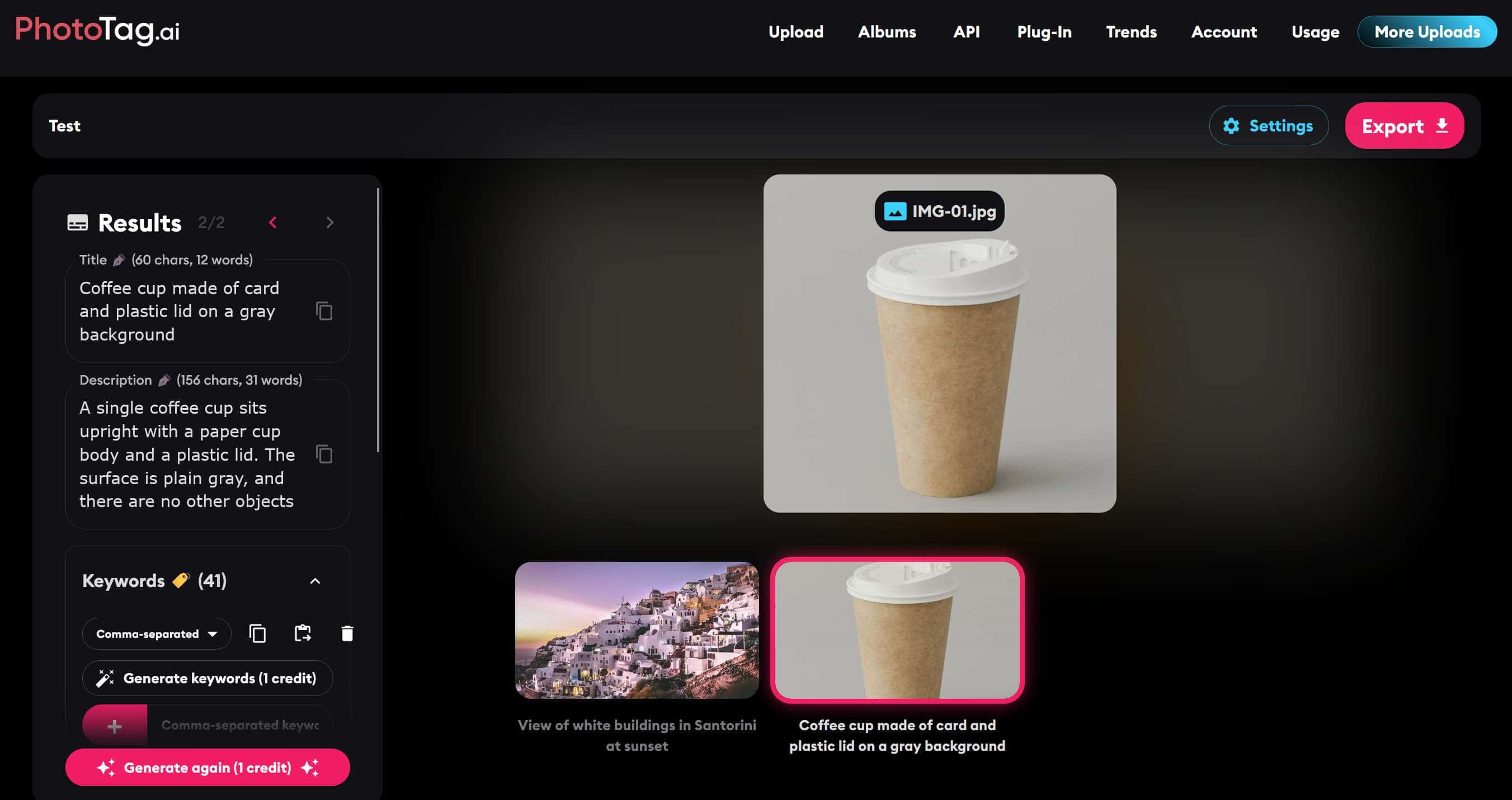
Final score: 78.72 / 100
Metadata Quality: 51.02 / 65
Workflow & Features: 27.70 / 35
Best For: contributors who want flexible editing controls, embedded metadata and inexpensive non-expiring credits.
- 3 free credits
- AI titles, descriptions and keywords
- Batch processing from 500 up to 1,500 files, depending on purchased tier
- Extensive custom context / output controls
- Regeneration and manual editing
- IPTC, XMP, EXIF and QuickTime metadata embedding
- Lightroom Classic plugin
- CSV export
PhotoTag also has unusual video economics: it charges one upload credit per video regardless of video duration, although the maximum file size depends on the purchased package.
- Highest Editing & Customization score: 4.3 / 5
- Good embedded metadata support
- Photo and video support
- Very large batches on higher credit packs
- Pretty inexpensive paid credits
- Metadata quality was substantially below the top four in our benchmark
- Free-mode copying / export limitations made the trial frustrating
- No dedicated iStock & Getty controlled-vocabulary disambiguation
- Vector support is primarily SVG rather than the broader EPS/AI support
My Take
PhotoTag performed reasonably well on several scenes, but struggled more with product specificity, business scenes, lifestyle imagery and detailed stock-oriented keyword ordering.
During testing, free / test mode allowed metadata generation, but restricted copying the generated title, description and keywords, and export was unavailable.
Attempts to use those actions repeatedly triggered upgrade / package prompts, which made the free evaluation experience feel quite sales-heavy. The metadata itself was not penalized for this restriction; it affected workflow and free-access scoring instead.
6. ImStocker Vision
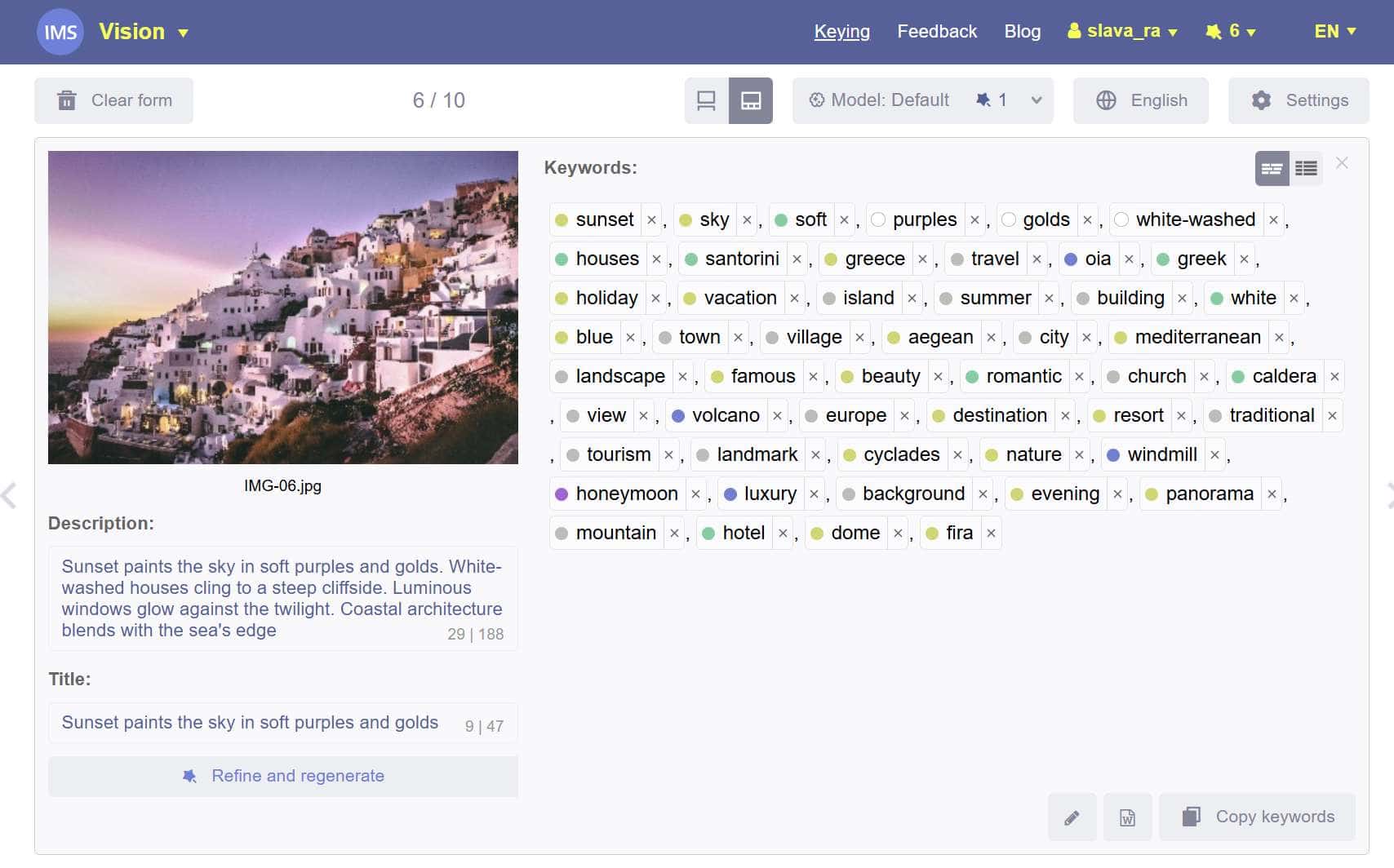
Final score: 78.26 / 100
Metadata Quality: 51.06 / 65
Workflow & Features: 27.20 /35
Best For: contributors who prioritize low processing cost and are comfortable reviewing / editing AI output manually.
- 20 free recognitions
- AI titles, descriptions and keywords
- Photos, illustrations, vectors and videos
- Keyword popularity/selling-oriented ranking
- Recognition history
- CSV export and API
- Integration with ImStocker Studio for embedded metadata and broader contributor workflow
- Video analysis through multiple extracted frames
ImStocker's browser workflow supports MP4 video, while IMS Studio supports broader formats and automatically splits video into frames for Vision.
- Multi-frame video workflow through IMS Studio
- Useful smart keyword replacement/editing
- Desktop integration can write metadata into files
- Good option for users willing to review metadata manually
- Default-mode metadata quality was noticeably below the leaders
- Lowest Editing & Control score in our benchmark
- More speculative contextual/location terms appeared in testing
- Full video workflow is more fragmented because Studio is needed for the strongest implementation
My Take
ImStocker generally recognized the main visible subject correctly. Weaknesses appeared in hallucination control, contextual inference, keyword ordering and noisy tail keywords.
7. CyberStock
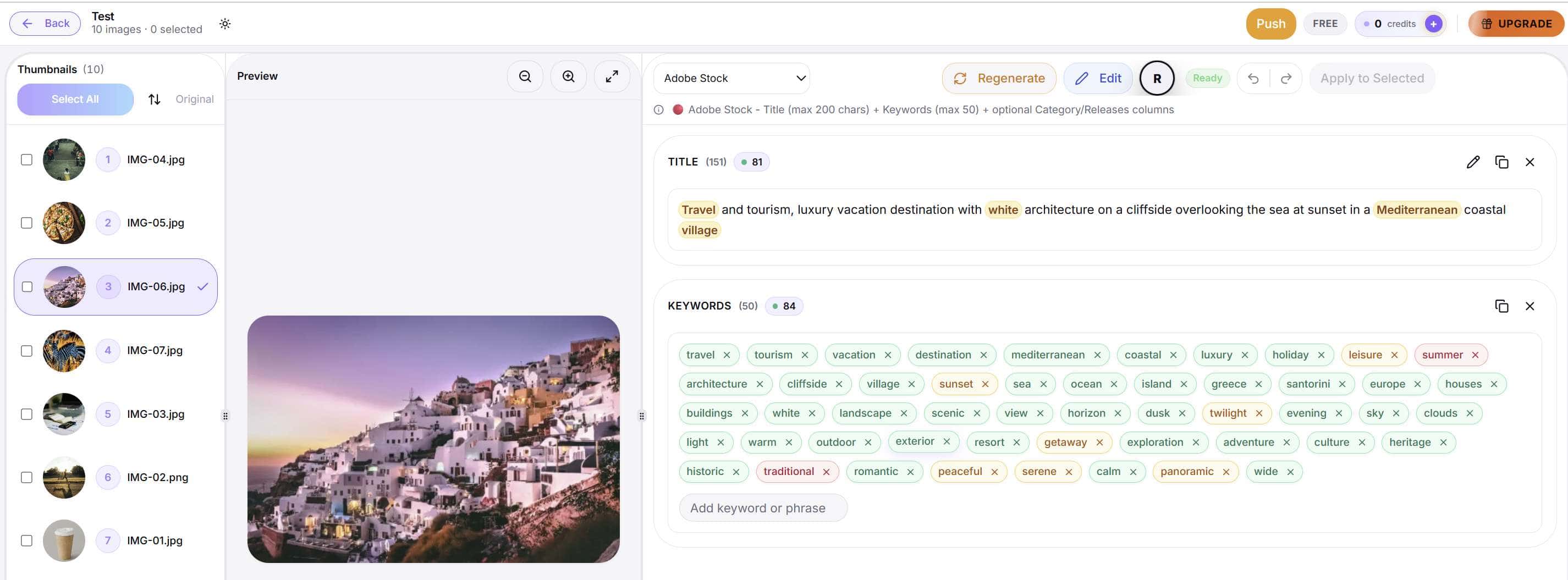
Final score: 65.21 / 100
Metadata Quality: 39.26 / 65
Workflow & Features: 25.95 / 35
Best For: users who specifically prefer concept-heavy, commercially oriented keyword generation and are prepared to review / reorder the metadata manually.
- 20 free credits
- Titles, descriptions and keywords
- Marketplace-specific presets
- Large batch processing
- CSV exports and embedded IPTC / XMP support
- Automated stock-agency submission
CyberStock currently markets support for photos, videos and vectors and claims batch workflows ranging into very large agency-scale jobs. It also combines metadata generation with market-intelligence features and automated multi-agency submission.
- Large-scale batch capabilities
- Photo, vector and video workflow
- Automated agency-upload functionality
- Embedded metadata and platform-specific exports
- Very weak keyword-ordering score: 5.81 / 15
- Top-10 Quality only 5.93 / 18
- Broad commercial concepts frequently displaced the visible subject
- No dedicated iStock & Getty controlled-vocabulary / disambiguation workflow
My Take
CyberStock often recognized the correct subject, but in our benchmark it frequently ranked broad commercial concepts ahead of the visible content.
For example, the pizza image began with terms like gastronomy, catering, hospitality, and lifestyle, while the Santorini image prioritized travel, tourism, vacation, and luxury before the specific destination.
📌 That approach may reflect buyer intent, but for stock platforms such as Adobe, where relevance and keyword priority matter, I would review and reorder metadata carefully before submission.
Pricing & Value Comparison
AI keywording pricing is difficult to compare directly. Some tools charge one credit per image. Others charge multiple credits for a complete metadata generation. For example Noamax AI include iStock & Getty processing in the standard workflow, while others charge additional credits.
| Tool | Free Access | Main Paid Options | Pricing Model | Important Notes |
|---|---|---|---|---|
| Noamax AI | 20 credits | $9.99 / 500, $17.99 / 1,000, $34.99 / 2,500, $59.99 / 5,000 monthly; PAYG (Pay As You Go) starting from $3.99 / 50 | Subscription & PAYG | 1 image = 1 credit; 1 video = 3. PAYG credits don't expire. Automatic 20% dashboard discount was available during testing. Getty processing included. |
| Pixify Studio | 10 credits | $5 / 100; $39 / 1,500; larger plans available | Subscription + add-ons | Standard processing = 1 credit. Dedicated iStock & Getty generation uses more credits. |
| PhotoKeyworder | 20 credits | €8.99 / 400; €11.99 / 1,000; €32.99 / 3,000; prepaid options available | Subscription & PAYG | Prepaid credits don't expire. Getty processing uses additional credits. |
| Xpiks | 14-day Pro+ trial | €99 / year with 4,000 AI credits/month; additional credit packs available | Annual subscription + top-ups | Complete title + description + keyword generation uses 5 credits, approximately 800 complete image generations/month from included allowance. |
| ImStocker Vision | 20 recognitions | V-500 $42 / year; V-2500 $85 / year; booster packs available | Subscription + boosters | Default = 1 credit, Extra = 2, Thinking = 5. Benchmark used Default. |
| PhotoTag | 3 credits | During testing: 2,000 credits for $18; 10,000 / $59; 50,000 / $190 | PAYG | Low paid cost per image and non-expiring credits. Current pricing was promotional during testing. |
| CyberStock | 20 credits | Monthly: $9/mo for 200 credits, $19/mo for 800, $49/mo for 3,000; Unlimited $79/mo. Annual pricing starts at $7/mo. | Subscription & PAYG | Top-ups never expire: 1,000 credits for $35, 60,000 for $189.98, 120,000 for $349.98. |
What We Learned From Testing 7 AI Keywording Tools
Across the benchmark, the biggest differences were not simply whether a tool could generate keywords, but how well it prioritized, filtered and organized them for real stock workflows.
Several tools recognized many of the same concepts, yet produced very different results once keyword order, hallucination control, stock-platform readiness and day-to-day usability were considered. These were the patterns that stood out most consistently during testing.
1. Generating Keywords Is No Longer the Hard Part
All seven products could generate substantial keyword lists. The harder problem is deciding which keywords deserve to be first.
2. Keyword Coverage and Keyword Quality Are Different Things
CyberStock illustrates this clearly. Coverage: 11.71 / 15 and Ordering: 5.81 / 15. The system frequently found useful concepts but placed them in weak positions.
3. The First 10 Keywords Exposed the Biggest Differences
The Top-10 results separated the tools more clearly than broad concept recognition. Modern AI systems often recognize similar concepts. The stronger stock-oriented systems do a better job deciding which ones deserve priority.
4. More Commercial Keywords Do Not Automatically Create Better Stock Metadata
📌 Commercial intent is useful. A running image can reasonably support fitness, exercise, health and training. But starting with wellness, endurance, motivation, performance and lifestyle before establishing runner / running makes the metadata less precise.
The strongest outputs tended to follow:
subject → action → important details → setting → strong concepts → broader commercial ideas
5. Hallucinations Often Sound Completely Reasonable
The most dangerous metadata errors were rarely absurd. They were plausible. A group of people could plausibly be friends. They could plausibly be tourists. A pizza with pineapple could plausibly be Hawaiian. An abstract render could plausibly illustrate artificial intelligence.
📌 Plausibility is not the same as factual visual support.
6. People Were Harder Than Objects
IMG-04 had the lowest average score in the benchmark. The difficulty came from relationships, ethnicity, location, purpose, occupation, tourism and family-status assumptions rather than simple person detection.
7. Abstract Images Are an Excellent Hallucination Test
IMG-10 created the largest score spread in the benchmark.
Reasonable terms included: abstract, geometric, blocks, shapes, 3D, floating, minimal, design. The temptation was to continue into: AI, blockchain, network, data, innovation, cloud computing, architecture.
Those may be commercial use cases, but they are not necessarily things the image depicts.
8. Landmark Recognition Is Already Very Strong
Santorini produced some of the strongest results. Noamax AI, Pixify and PhotoKeyworder all correctly recognized highly specific geographic concepts. The remaining differentiation was primarily exact specificity, ordering and avoidance of generic filler.
9. Price and Quality Were Not Strongly Correlated
The cheapest tool did not produce the best metadata.
- ImStocker (Lowest Cost): Pricing & Value: 4.9 / 5 vs Metadata Quality: 51.06 / 65
- Noamax.ai (Strong Value): Pricing & Value: 4.6 / 5 vs Metadata Quality: 59.98 / 65
- Pixify (Higher Cost): Pricing & Value: 3.6 / 5 vs Metadata Quality: 56.97 / 65
📌 A simple price-per-credit ranking would therefore be misleading.
Stock Photo Keywording Tools vs ChatGPT
Modern general-purpose AI systems can analyze an image and generate titles, descriptions and keywords. For a handful of images, that may be perfectly reasonable. Dedicated stock keywording tools become more useful when the workflow involves:
- batch processing of dozens, hundreds or thousands of files
- consistent titles, descriptions and keyword structures across every batch
- intelligently ranked keywords rather than an unordered list of relevant terms
- consistent keyword counts and metadata-length limits
- stock-platform-specific rules and metadata formatting
- reliable handling of very different content types within the same workflow
- multi-frame video analysis instead of judging a video from a single frame
- photo, illustration, vector and video support
- automatic iStock & Getty controlled-vocabulary matching and disambiguation
- Adobe-oriented keyword prioritization where the strongest terms need to appear first
- reusable presets, instructions and platform-specific settings
- CSV exports formatted for individual stock agencies
- bulk editing, regeneration and metadata review
- processing history and the ability to reopen previous batches
- embedded IPTC/XMP metadata in tools that support it
- error handling, retry and recovery for large batches
- maintaining consistent metadata quality from one batch to the next
📌 That consistency becomes increasingly important when a batch contains very different subjects - for example products, people, food, landscapes, wildlife, interiors and abstract content - where the same stock-oriented rules still need to be applied to every file.
For that reason, ChatGPT was not included as an eighth ranked product. It is a general-purpose AI system rather than a dedicated stock-keywording tool, and scoring it against product categories would create an uneven comparison.
Frequently Asked Questions
What Is the Best Stock Photo Keywording Tool?
In our 100-point benchmark, 🥇 Noamax.ai ranked first with 91.88 / 100. It also had the highest average metadata-quality score across the 10 benchmark images.
Does Adobe Stock Care About Keyword Order?
Yes.
Adobe recommends ordering keywords by importance, with the strongest and most relevant terms placed first.
That is why our benchmark gives substantial weight to first-10 keyword quality rather than merely checking whether a useful term appears somewhere in a long list.
How Many Keywords Should I Use for Adobe Stock?
There is no benefit to filling every available keyword position with weak or marginally relevant terms. The more important goal is accurate, relevant keywords with the strongest concepts first.
A shorter, tightly focused list can be more useful than filling all 49 keyword slots with generic or marginally relevant terms.
Can AI-Generated Keywords Hurt Microstock Performance?
Poor AI metadata can create several problems:
- important keywords can be buried too far down
- generic terms can dilute the list
- unsupported concepts can make metadata less accurate
- incorrect locations, relationships or activities can misdescribe the asset
AI-generated metadata should still be reviewed before submission.
Which Tools Support iStock & Getty Keywording?
Among the products tested, Noamax.ai had the strongest dedicated iStock & Getty workflows.
It includes controlled-vocabulary matching and disambiguation directly in its standard workflow. PhotoKeyworder and Pixify also offer Getty-oriented processing, although credit usage differs.
Which Microstock Keywording Tool Has the Best Batch Workflow?
Noamax.ai received the highest Batch Workflow, UI/UX & Productivity score at 9.8 / 10.
It's primary advantage was the combination of batch processing, efficient review and persistent editable history.
Final Verdict
After testing seven dedicated microstock keywording tools against the same 10-image benchmark, the biggest difference was not whether the systems could recognize obvious objects.
Most could. The real separation happened in what they did with that recognition:
- Could they identify the most important and accurate concepts?
- Could they prioritize the strongest keywords first?
- Could they avoid unsupported assumptions and misleading metadata?
- Could they maintain quality across very different image types?
- Could they consistently produce metadata suited to stock-platform requirements?
- Could they simplify platform-specific workflows such as iStock & Getty disambiguation?
- And after generation, could a contributor efficiently review, edit and export hundreds of files?
| Rank | Tool | Final Score / 100 | Metadata Score / 65 | Workflow & Features Score / 35 |
|---|---|---|---|---|
| 1 | Noamax AI 🥇 | 91.88 | 59.98 | 31.90 |
| 2 | Pixify Studio | 86.67 | 56.97 | 29.70 |
| 3 | PhotoKeyworder | 86.09 | 56.69 | 29.40 |
| 4 | Xpiks | 82.87 | 55.32 | 27.55 |
| 5 | PhotoTag | 78.72 | 51.02 | 27.70 |
| 6 | ImStocker Vision | 78.26 | 51.06 | 27.20 |
| 7 | CyberStock | 65.21 | 39.26 | 25.95 |
🥇 Noamax.ai finished first overall, with the strongest average metadata score and the highest workflow & features score.
The most important conclusion is that different workflows genuinely favor different products. This benchmark is intended to make those trade-offs visible.
📌 Better metadata cannot guarantee higher rankings or sales, but accurate, relevant and properly prioritized metadata gives microstock content a stronger foundation for discoverability.

Viacheslav is a professional microstock contributor with 15 years of industry experience. His portfolio includes more than 10,000 professional 3D illustrations, photos and videos, with work licensed worldwide through major stock platforms including Adobe Stock, Shutterstock, iStock and Getty Images. Over the years, he has built extensive hands-on experience of preparing content for major microstock platforms.